PLC Trainer UI PLC 3DA About
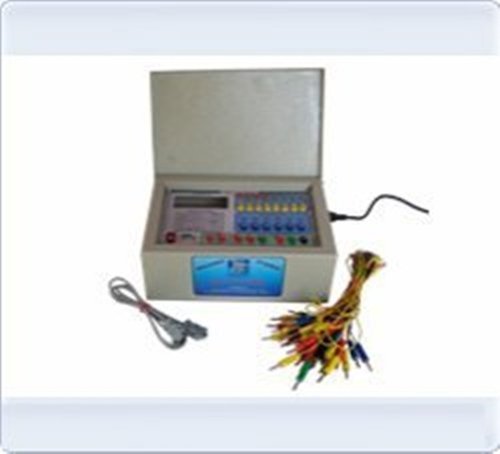
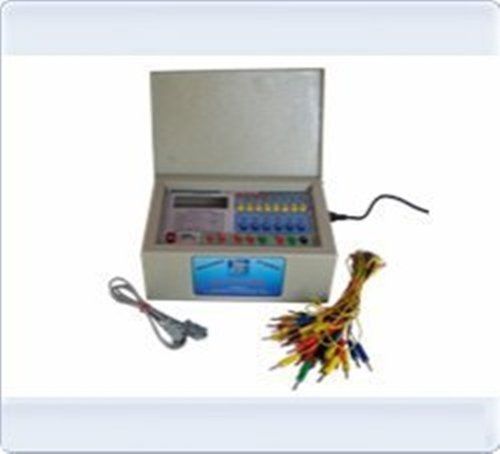
PLC Trainer UI PLC 3DA
| Usage/Application |
Laboratory |
| Brand |
Micro Technologies |
| Power Supply |
230V +-10% @50Hz |
| PLC Make |
ABB, Siemens, Delta or Equivalent. |
| Digital I/O |
8 DI-24 V, 6DO-24V |
| Analog I/O |
4 Analog Input 4-20mA, 0to 10V, 2Analog O/P 4-20mA, 0to 10V |
| Inbuilt Power Supply |
24V @1A +15V-0-15V@500mA |
| I / O Simulation |
4 No. Push button, 4 No. toggle switch 6 No. LED, 4Nos Potentiometer for analog input |
| I / O Termination |
4 No banana sockets-22 nos |
| PC Interface |
RS232 Serial Port with cable. |
| Enclosure (mm) |
Powder coated Metal box 450(W) X 400(D)X150(H) |
Comprehensive PLC Training PlatformDesigned for educational and industrial automation use, the PLC Trainer UI PLC 3DA seamlessly integrates hardware and software for an immersive learning experience. With advanced features such as real-time simulation, customizable test ranges, and visual LED indicators for each I/O point, trainees can practice and master PLC programming concepts with immediate feedback and reliable performance metrics.
Versatile Hardware & Reliable PerformanceThe trainer includes 14 digital inputs, 10 outputs, and both analog input/output channels, suitable for a range of automation tasks. Built with an aluminium and ABS enclosure and rated IP20, it delivers durability and safety in laboratory settings. Shielded cables and LED status indicators improve operational accuracy, while programmable speed and configuration flexibility make it suitable for diverse specimen testing.
Flexible Software & AccessibilityThe bundled software supports Windows XP to Windows 10, making it accessible for most laboratory and office setups. User-friendly demo exercises and adaptable control modes (manual and automatic) encourage hands-on learning while supporting in-depth experimentation. RS232 and USB interfaces ensure easy system integration and data management for trainers, suppliers, and automation specialists.
FAQ's of PLC Trainer UI PLC 3DA:
Q: How do I use the demo exercises included with the PLC Trainer UI PLC 3DA?
A: The demo exercises can be accessed through the included software suite, compatible with Windows XP/7/8/10. Follow the step-by-step instructions in the software to practice PLC programming and simulate automation scenarios using both manual and automatic control modes.
Q: What are the benefits of using the PLC Trainer for educational applications?
A: The PLC Trainer provides hands-on experience in ladder logic programming, real-time I/O simulation, and automation processes. Its visual indicators and digital display facilitate instant feedback, helping students grasp PLC concepts efficiently while fostering troubleshooting and programming skills necessary for industrial automation.
Q: Where can this PLC Trainer be installed and used safely?
A: Thanks to its IP20 protection class and sturdy aluminium/ABS enclosure, the PLC Trainer is safe for operation in educational labs, training centers, and industrial environments. It is designed for tabletop mounting and requires a standard 220V AC power supply.
Q: What is the process for connecting and programming digital and analog I/Os?
A: Connect shielded cables to the 24-pin I/O port, ensuring correct pairing of inputs and outputs. Programming is done via Ladder Logic in the compatible software, which allows configuration of all digital and analog channels for simulation or live automation tasks. LED indicators signal each I/O's operational status.
Q: When should I opt for expansion capability with this trainer?
A: Expansion is recommended when additional I/O or advanced testing features are required for complex automation projects. Expansion modules can be integrated as your training or application needs grow, ensuring scalability for future educational or industrial demands.
Q: What control modes does the PLC Trainer support and how are they selected?
A: The trainer supports both manual and automatic control modes. You can select or switch modes directly within the software interface, allowing flexible demonstration of automated processes or manual intervention during training sessions.
Q: How is measurement accuracy ensured during specimen testing?
A: The system achieves 0.1% accuracy and 0.01 mm resolution, with programmable test speeds and widths. The digital LCD and software configuration tools allow precise setup and monitoring, ensuring reliable measurement and data acquisition for every specimen tested.






 Send Inquiry


 Send Inquiry


 English
 Spanish
 French
 German
 Italian
 Chinese (Simplified)
 Japanese
 Korean
 Arabic
 Portuguese