About PLC Trainer UI PLC 5D
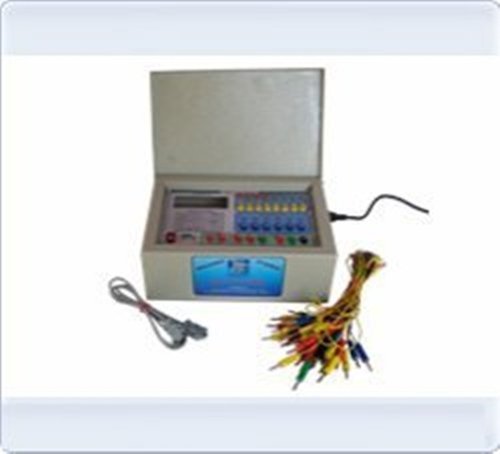
PLC Trainer UI PLC 5D
| Brand |
Micro Technologies |
| Power Supply |
230V +-10% @ 50 Hz |
| PLC Make |
ABB, Siemens, Delta or Equivalent |
| Digital I/O |
12 DI-24V, 10DO-24V |
| Inbuilt Power Supply |
24V @ 1A +15V-0-15V @ 500mA |
| I / O Simulation |
6 No Push button, 6 No toggle switch 10 No. LED |
| I / O Termination |
4mm banana socket. |
| PC Interface |
RS232 Serial Port with cable. |
| Enclosure |
Powder coated metal box 300(W) X 250(D) X 150 (H)
|
Advanced Safety and AutomationBuilt with emergency stop and circuit breaker functions, the PLC Trainer UI PLC 5D ensures safe practice during automation training sessions. Its PLC-based automatic control and fault injection features offer hands-on, real-world simulation for students and professionals. The HMI integration and interactive simulation provide intuitive control and visualization, boosting confidence in equipment handling.
Comprehensive Connectivity and ProgrammingSupporting Modbus, RS485, USB, and LAN, this trainer facilitates data communication and real-time monitoring. Compatibility with Windows and PLC simulation suites allows enthusiastic learners to develop projects using ladder logic or function block programming. With sample projects and complete documentation included, users can progress from basic to advanced experiments using industry-standard protocols.
Flexible Testing and Data ManagementThis bench-top unit enables precise control over test speed, width, stroke, and specimen number through its intuitive UI. The internal memory allows for detailed data logging, with convenient export options for further analysis. The digital LCD display, 0.01 mm resolution, and rapid response time ensure accuracy and immediate feedback during experiments.
FAQ's of PLC Trainer UI PLC 5D:
Q: How do I operate the emergency stop and circuit breaker protection features on the PLC Trainer UI PLC 5D?
A: The PLC Trainer UI PLC 5D is equipped with an accessible emergency stop button and integrated circuit breaker. Simply press the emergency stop in case of any unsafe condition; this immediately halts all functions. The circuit breaker automatically disconnects power during electrical faults, ensuring operator safety.
Q: What programming options are available for the PLC Trainer UI PLC 5D?
A: You can program the trainer using both ladder logic and function block approaches. It is compatible with PLC simulation software on Windows, allowing flexible development and testing of various industrial automation scenarios. Sample projects and documentation are provided for easy learning.
Q: When should I use Manual, Auto, or Step simulation modes?
A: Manual mode offers direct control for each test operation, ideal for learning individual component functions. Auto mode executes pre-defined tasks, suitable for process automation exercises. Step mode advances the procedure incrementally, supporting demonstration or fault diagnosis workflows.
Q: Where can the PLC Trainer UI PLC 5D be installed for educational purposes?
A: This bench-top device is designed for laboratory, classroom, and training center environments. Its compact size and industrial build enable safe use on standard workbenches or desks with moderate electricity and pneumatic gas supplies.
Q: What is the process for exporting logged test data from the PLC Trainer UI PLC 5D?
A: To export logged data, use the internal memory's export function via USB or LAN interfaces. You can securely transfer experiment records for analysis, archiving, or sharing. Detailed steps are included in the provided documentation.
Q: How is the equipment utilized for specimen testing and what customization options exist?
A: The trainer accommodates 1 to 5 specimens, with a standard size of 150x60 mm, but customization is supported for user-defined specimen dimensions. Adjustments to test speed, width, and stroke are made via the UI, allowing flexibility in simulation and demonstration.
Q: What are the main benefits of using the PLC Trainer UI PLC 5D for automation training?
A: Users gain hands-on experience with real industrial protocols, enhanced safety features, accurate digital measurements, and instantaneous LCD feedback. The equipment's interactive simulation and educational resources support skill development for aspiring automation professionals.







 Send Inquiry


 Send Inquiry


 English
 Spanish
 French
 German
 Italian
 Chinese (Simplified)
 Japanese
 Korean
 Arabic
 Portuguese